

- 360 REALITY CAPTURE WEB APPLICATION
360 Reality Capture
See it. Assign it. Improve it.
Document site progress visually, manage the work remotely and, with Wendy AI, see whether planned work is being done in the right places.
Simple. Clear. Functional.
360 Reality Capture is an easy way to document your site visually, manage the work remotely and improve productivity continuously.
360 Reality Capture is a cloud-based web application and one of the modules of the Aiforsite platform. A demo project is included, so you can try it out even if you do not have a camera yet.
See it.
See in a matter of minutes where you have problems and identify their root causes.
Assign it.
Assign responsible persons to remove observed problems and deviations.
Improve it.
Document the work progress, learn and improve the workflow continuously.
How it works
Record. Upload. Review.
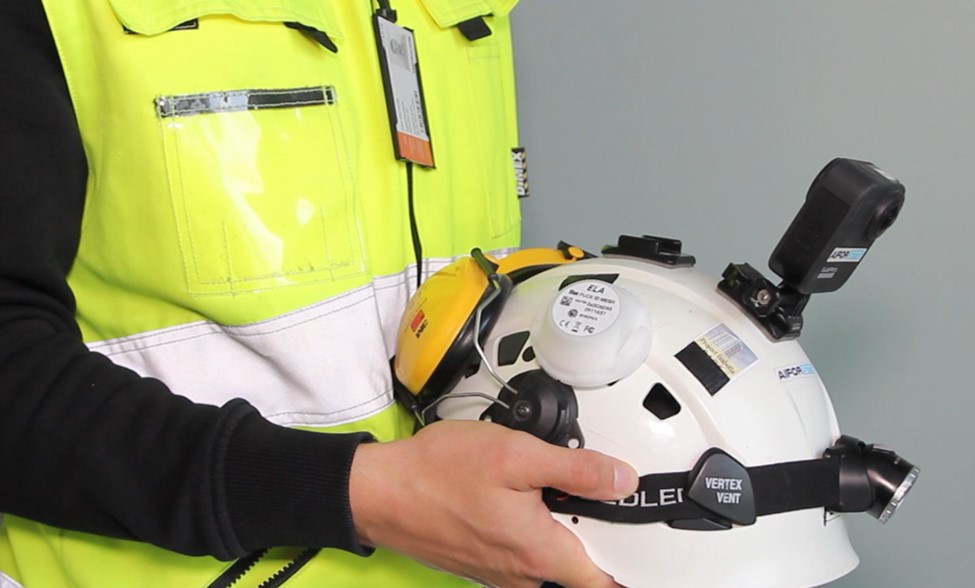
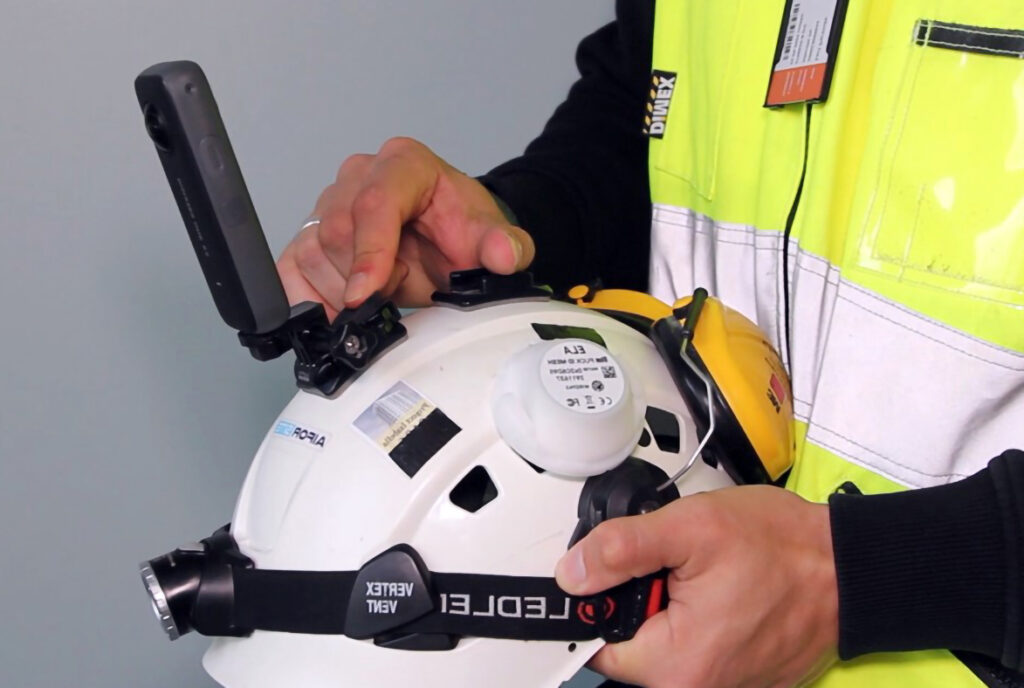
1. Record: walk the site with an Insta360 camera. We recommend the Insta360 X5 or a newer model. Use Insta360’s own free app, available for both iOS and Android.
2. Upload: upload the recordings from your computer to the 360 Reality Capture Web Application, where they are linked to your floor plans.
3. Review and act: move through the site on the floor plan, make observations on safety, quality and schedule, and assign them to the right people.


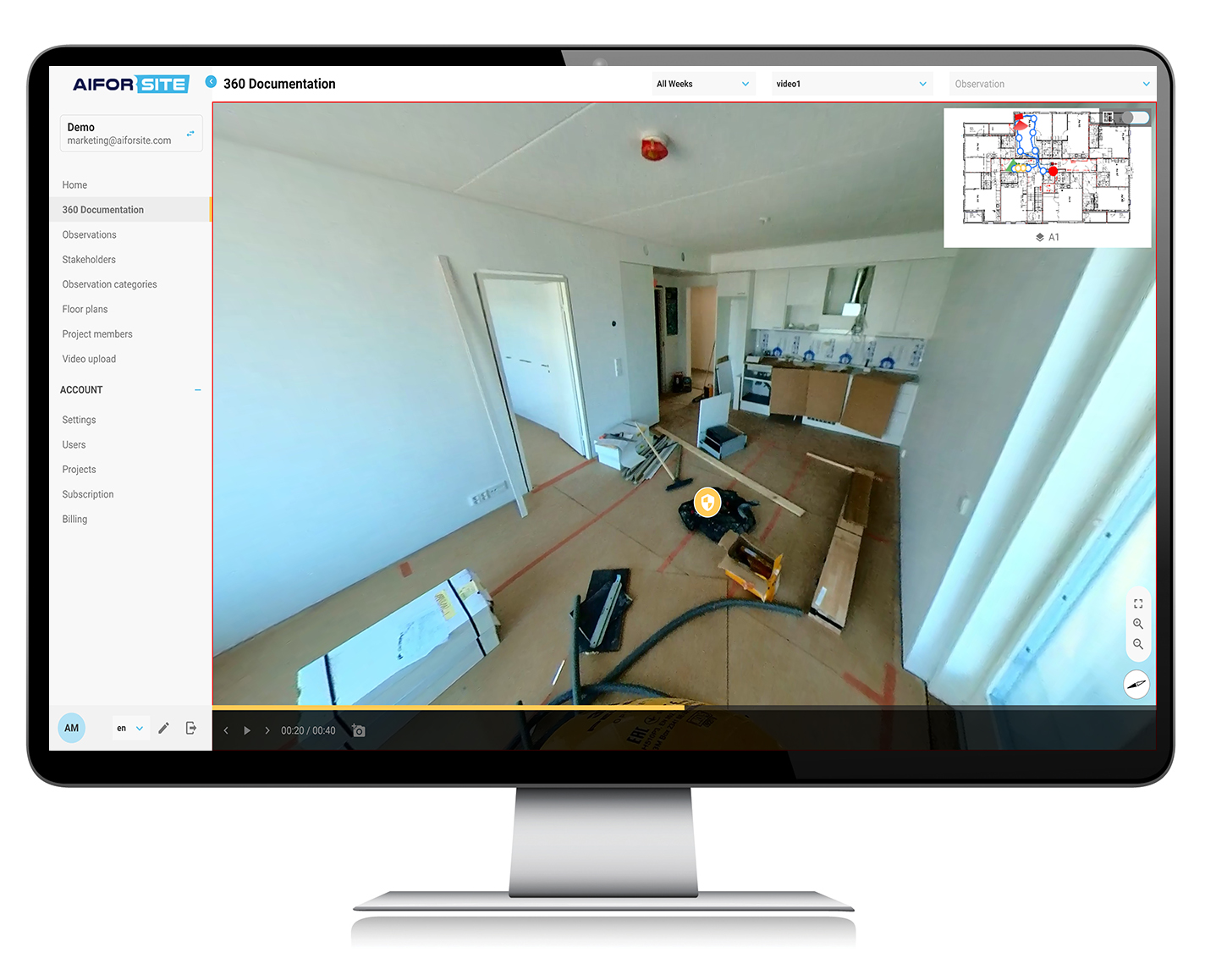
360 Reality Capture Web Application
All the 360 images and videos you have recorded on site are available for review in the 360 Reality Capture Web Application at aiforsite.io, on desktops and laptops.
Select the area or floor, the date and the place you want to view. The walkthrough path lets you move to the desired location by clicking points on the floor plan.
View, make observations, and assign tasks
You can check visually identifiable prerequisites of the working areas, such as the state of cleanliness, material availability, workers, or critical tools.
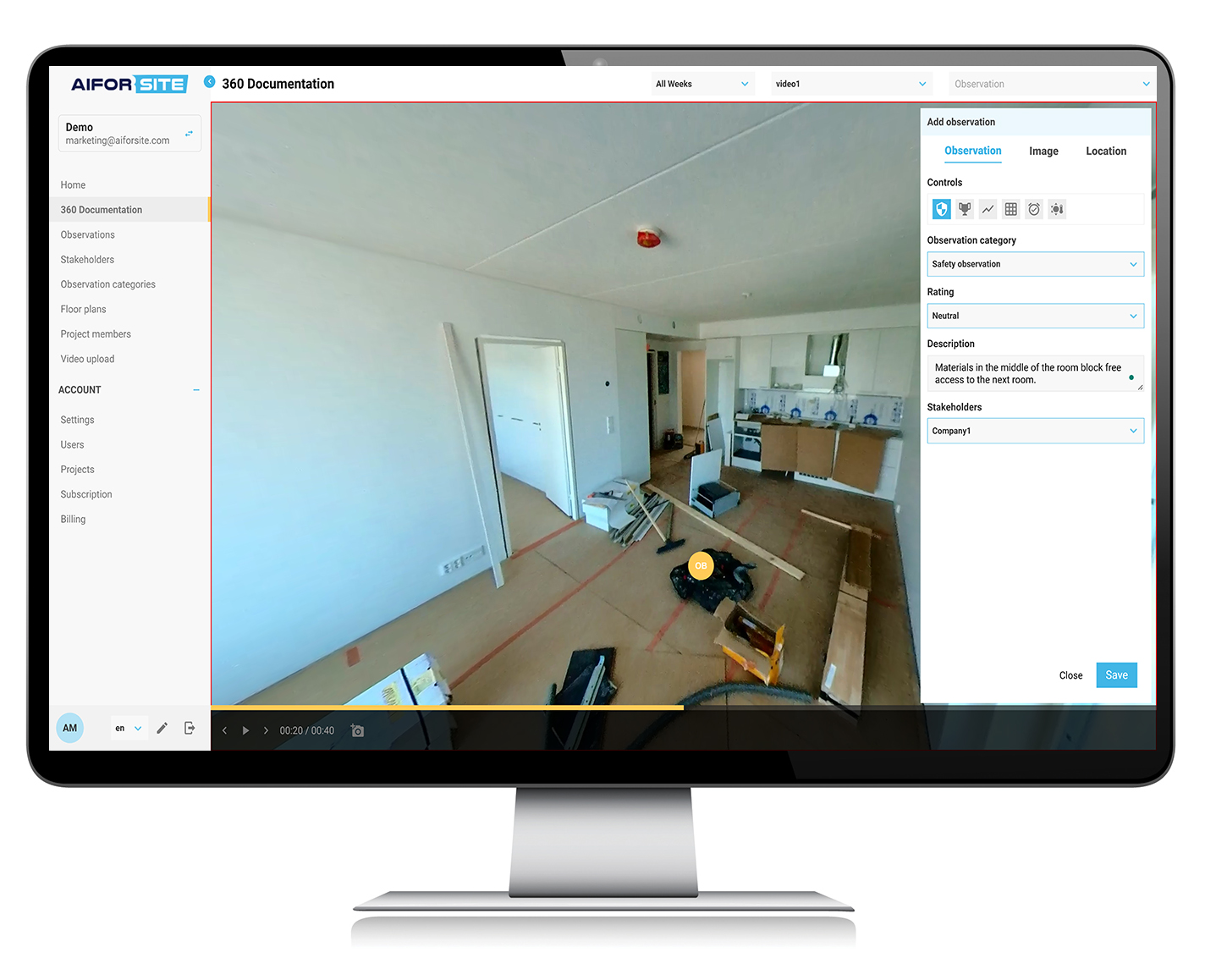
Once you have identified a need for corrective actions, you may add observation notes on occupational safety, quality, and other matters on the video image.
The system generates a ticket that can be assigned and tracked. The tickets are sent from the platform by email, and the recipients can open and react to the observation notes directly in the email without the need to log into the system.
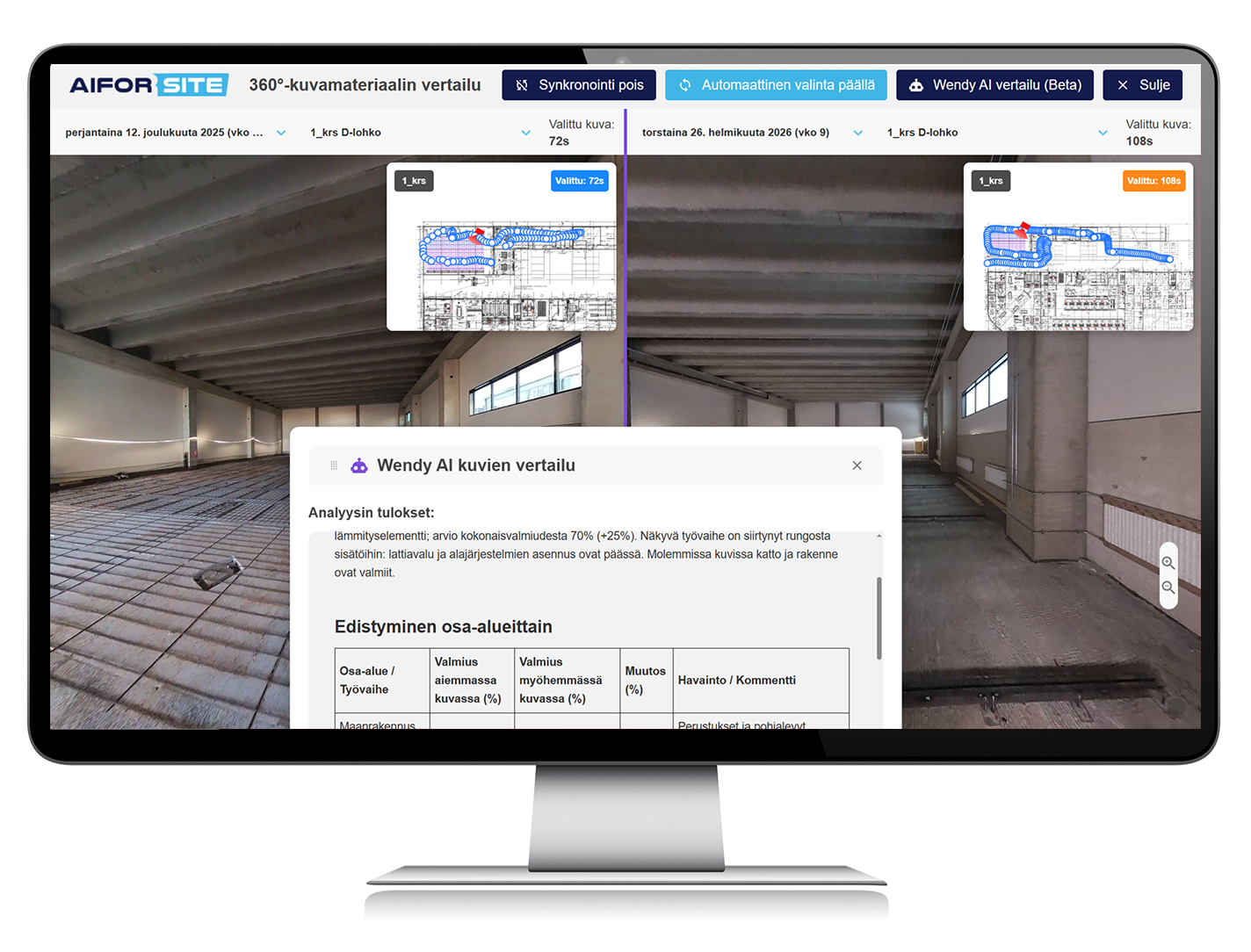
Compare progress and get an instant progress report
Compare two selected capture dates in the same view and see clearly how the site has progressed. Identify what has been completed, where work has advanced, and where delays or sequencing issues may be forming.
With one click in the comparison view, Wendy AI analyses the selected dates and creates a progress report. It estimates changes in completion, identifies visible work phases and provides a structured summary to support decision-making. This is included in the 360 Reality Capture module.
Together, the comparison and the Wendy AI analysis give contractors and clients a shared, objective source of truth without additional reporting work.
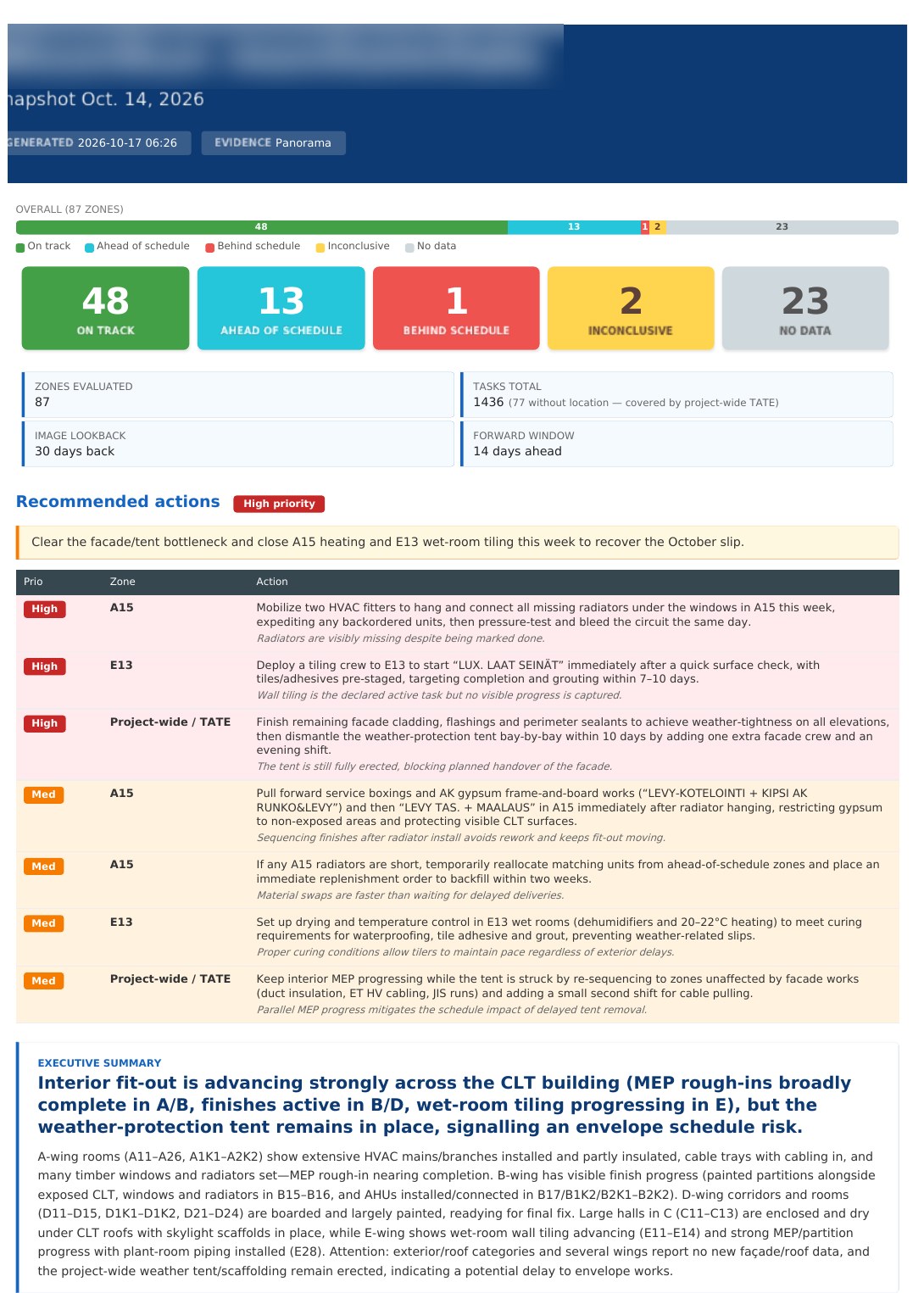
With Wendy AI: are planned tasks being done in the right places?
When you use 360 Reality Capture together with the Wendy AI module, you get an automated workflow. Wendy compares your schedule with the latest 360 material and produces a report for site management, area by area. The report can be scheduled, for example weekly, or run on request.
- Overview: how many areas are on time, ahead, behind, cannot be confirmed or have no images.
- Prioritised actions: what to tackle first, each with the visual evidence behind it.
- Evidence by area: the panoramas used, capture dates, confidence level and task-level findings.
- Honest about limits: hidden work, such as cables inside walls, is marked as “cannot be confirmed” rather than assumed complete.
Example from a public building project: 87 zones and 1,436 tasks reviewed in one report, with zones ahead of and behind schedule identified and the reasons visible in the images.
360 Reality Capture Features
Recording on site
You need an Insta360 camera. We recommend the Insta360 X5 or a newer model. Recording is done with Insta360’s own free app, which works on both iOS and Android phones.
Connect the camera to the Insta360 app and record a walkthrough of the area as a 360 video. Walk at a steady pace along the route you want to document.
Transfer the recordings from the camera’s memory card to your computer.
Log in to the 360 Reality Capture Web Application at aiforsite.io, select the project and floor plan, and upload the recordings. The walkthrough path is calculated automatically.
The web application features
- Create a user account at aiforsite.io.
- Explore features and functionalities with the demo project included in the app by default.
- Create a project by entering basic information about your site, add your team members, and upload floor plans of the building.
- Upload your recordings from your computer.
The application offers you the possibility to view the 360 video recordings as 360 images and move through the path by clicking markers on the images.
A minimap is automatically generated for each recorded session. You can move on the floor plan by clicking points on a walkthrough path.
The minimap has a real-time preview, flight mode on/off, changing the plan orientation, zoom in/zoom out option.
You can add, edit, or delete your observation records (for example, for prerequisites check, safety or quality issues). You can give a category, condition and description of the observation. You can also add a screenshot image of the place in question.
The path editor allows you to correct the route on the floor plan.
360 Reality Capture simplifies managing your project compliance with Building Safety Act (and its ”Golden Thread”) and Part L.

Reality Capture Pricing
Pro Plan
169 EUR/month + VAT
The Pro Plan includes:
- 360 Reality Capture Web Application for uploading recordings, viewing 360 images, making observations and assigning tasks
- Recording with Insta360’s own app (iOS and Android)
- Instant Wendy AI progress report between two capture dates
- Demo project
- 10 users per project
- 240 min/month of video upload
- 360 image viewer
- Automatic walkthrough calculation and path editor
- Data export
- Support: Aiforsite support portal
Recommended camera: Insta360 X5 or newer
Automated schedule vs. 360 reports are available with the Wendy AI module.
More than just site documentation.
As part of the Aiforsite platform, 360 Reality Capture complements the real-time picture of the site and helps manage and improve work performance.
With 360 Reality Capture you can:
- Ensure that task prerequisites are in place
- Identify problems and find their root causes faster
- Resolve disputes with objective visual evidence
- Share visual information with project stakeholders
- Support compliance with regulations such as the UK Building Safety Act (including the Golden Thread) and Part L
Frequently Asked Questions
What is the demo project?
Activate the demo project in the 360 Reality Capture Web Application when you create your user account. You can see how the product works even if you do not have a 360 camera yet, and try all features of the Pro Plan except adding your own recordings. The demo project includes a short 360 recording of a residential site: view 360 images, move along the walkthrough path, make and assign observations, create your own observation categories and add project members.
Why do I record 360 videos but see 360 images?
You record 360 videos and upload them to the Aiforsite cloud. The system extracts image frames every 1 to 2 seconds, which are lighter and need less storage. The Pro Plan includes the 360 image viewer.
Which app do I use to record?
Use Insta360’s own free app, available for both iOS and Android. Aiforsite no longer offers a separate mobile app. After recording, you upload the material from your computer to the 360 Reality Capture Web Application.
What does the Wendy AI module add?
Without the Wendy AI module, you can create an instant progress report between two capture dates with one click in the comparison view. With the Wendy AI module, you also get an automated workflow: Wendy compares your schedule with the latest 360 material and reports, area by area, whether planned tasks are being done in the right places. The report can be scheduled, for example weekly, or run on request.
Can I use the web application on a smartphone or tablet?
A desktop or laptop screen is best for viewing 360 images in detail, so the web application is designed primarily for computers rather than tablets or phones.